Shelly Cloud + Prometheus + Grafana를 활용한 완전 자동 전력 모니터링 아키텍처 구축기
지난 편(#7)에서는 Shelly Plug S의 로컬 API를 활용해 Prometheus와 Grafana로 실시간 전력량을 수집했습니다.
이번에는 한 단계 더 발전하여 Shelly Cloud API를 기반으로, 어떤 네트워크 환경에서도 안정적으로 동작하는 모니터링 시스템을 만들어봅니다.
☁️ 왜 Cloud 기반으로 바꿨을까?
Shelly Plug S는 로컬 IP 접근을 통해 실시간 데이터를 제공하지만,
- 네트워크 환경이 바뀌면 IP가 달라질 수 있고
- 외부에서 접근할 수 없으며
- 원격 측정이나 여러 장소에서 모니터링할 때 제약이 있습니다.
Shelly Cloud API는 디바이스가 Wi-Fi에 연결되어 있으면 어디서든 HTTPS를 통해 상태를 조회할 수 있습니다.
이번 편에서는 이 Cloud API를 Prometheus와 연동하여, WSL + Docker 환경에서도 완전히 자동화된 전력 수집 시스템으로 확장합니다.
🧱 시스템 구성
Shelly Plug S (Cloud)
    ↓ HTTPS REST API (Shelly Cloud)
Flask Proxy (8080)
    ↓ Local JSON Endpoint (/shelly_proxy)
json-exporter (Docker, :7979)
    ↓ Prometheus Metrics
Prometheus (Time Series DB)
    ↓ Grafana Dashboard (20443)
각 역할 요약:
| 구성요소 | 역할 |
|---|---|
| Shelly Cloud | 디바이스 상태를 HTTPS로 제공 |
| Flask Proxy | Cloud 응답을 중계 및 JSON 구조 변환 (switch:0 → switch_0) |
| json-exporter | JSON 데이터를 Prometheus 형식 메트릭으로 변환 |
| Prometheus | 시계열 데이터 수집 및 저장 |
| Grafana | 전문 대시보드 시각화 |
⚙️ 1단계: Flask Proxy 구성
WSL 환경에서 /opt/shelly_proxy/app.py 파일을 생성합니다.
from flask import Flask, Response
import requests
import json

app = Flask(__name__)

# Shelly Cloud credentials (고정)
SHELLY_DEVICE_ID = "ID HERE"
SHELLY_AUTH_KEY = "AUTH KEY HERE"

SHELLY_API_URL = "https://shelly-180-eu.shelly.cloud/device/status"


@app.route("/shelly_proxy")
def shelly_proxy():
    """Shelly Cloud proxy for Prometheus json_exporter"""
    try:
        # Shelly Cloud API 요청
        r = requests.post(
            SHELLY_API_URL,
            data={"id": SHELLY_DEVICE_ID, "auth_key": SHELLY_AUTH_KEY},
            timeout=10,
        )
        data = r.json()

        # key rename: "switch:0" → "switch_0"
        if "data" in data and "device_status" in data["data"]:
            ds = data["data"]["device_status"]
            if "switch:0" in ds:
                ds["switch_0"] = ds.pop("switch:0")

        return Response(json.dumps(data), mimetype="application/json")

    except Exception as e:
        error_msg = {"error": str(e)}
        return Response(json.dumps(error_msg), status=500, mimetype="application/json")


if __name__ == "__main__":
    app.run(host="0.0.0.0", port=8080)
Proxy가 정상 작동하면:
curl http://localhost:8080/shelly_proxy{
"data": {
"device_status": {
"switch_0": {"voltage":217.3, "apower":58.4, "current":0.46, ...},
"wifi": {"rssi": -58}
}
}
}


🐳 2단계: json-exporter 컨테이너 실행
docker rm -f shelly_json_exporter
docker run -d \
  --name shelly_json_exporter \
  -p 7979:7979 \
  -v /opt/json_exporter/modules.yml:/config.yml \
  prometheuscommunity/json-exporter:latest \
  --config.file=/config.yml
modules.yml 내용:
modules:
  shelly_power:
    headers:
      User-Agent: "curl/7.81.0"
      Accept: "application/json"
    metrics:
      - name: shellyplusplug_testPlusPlug_voltage
        path: '{.data.device_status.switch_0.voltage}'
        type: value
      - name: shellyplusplug_testPlusPlug_temperature
        path: '{.data.device_status.switch_0.temperature.tC}'
        type: value
      - name: shellyplusplug_testPlusPlug_currently_used_power
        path: '{.data.device_status.switch_0.apower}'
        type: value
      - name: shellyplusplug_testPlusPlug_current
        path: '{.data.device_status.switch_0.current}'
        type: value
      - name: shellyplusplug_testPlusPlug_relay_state
        path: '{.data.device_status.switch_0.output}'
        type: value
      - name: shellyplusplug_testPlusPlug_wifi_rssi
        path: '{.data.device_status.wifi.rssi}'
        type: value
테스트:
curl "http://localhost:7979/probe?module=shelly_power&target=http://host.docker.internal:8080/shelly_proxy"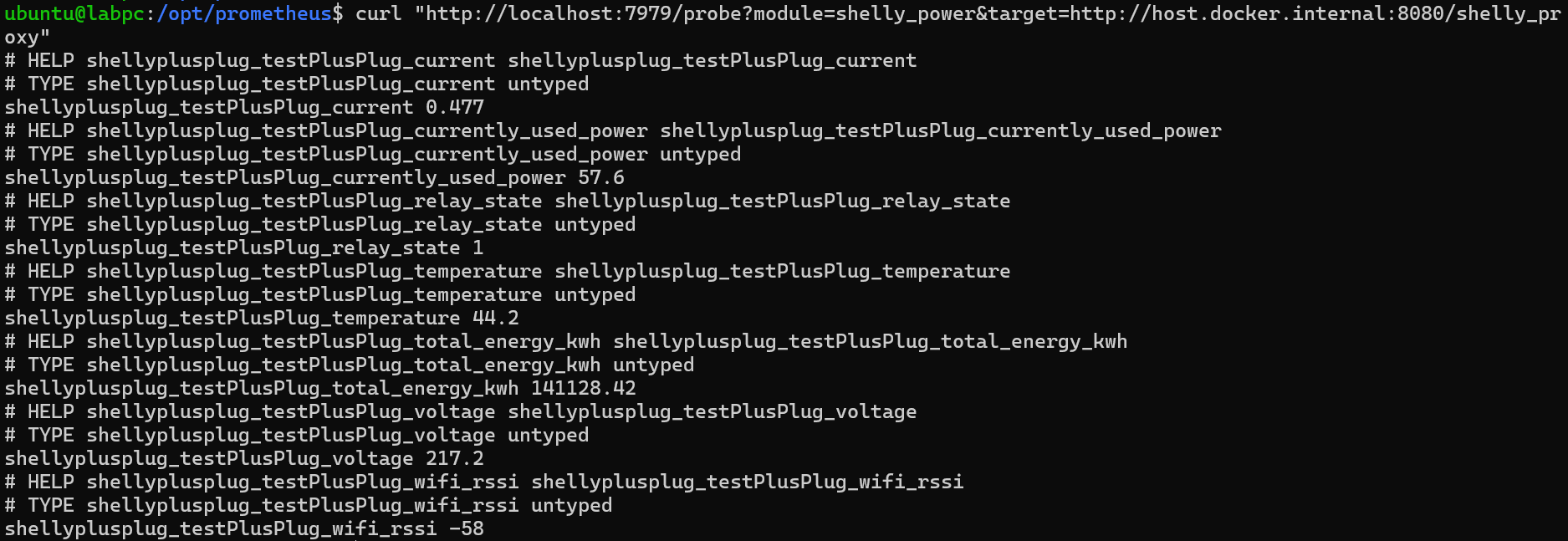
→ 정상적으로 메트릭 출력 시 성공 ✅
📊 3단계: Prometheus 연동
prometheus.yml에 다음 job 추가:
  - job_name: 'shelly_cloud'
    scrape_interval: 15s     # 15초 간격으로 수집
    metrics_path: /probe
    static_configs:
      - targets:
          - http://host.docker.internal:8080/shelly_proxy
    params:
      module: ['shelly_power']
    relabel_configs:
      - source_labels: [__address__]
        target_label: __param_target
      - target_label: __address__
        replacement: localhost:7979
Prometheus → Status → Targets 에서 UP 상태 확인 👇

📈 4단계: Grafana 대시보드 연동
Dashboard ID 20443 (Shelly Plug S용)을 불러옵니다.
Prometheus를 데이터 소스로 설정하면 자동으로 메트릭이 매칭됩니다.
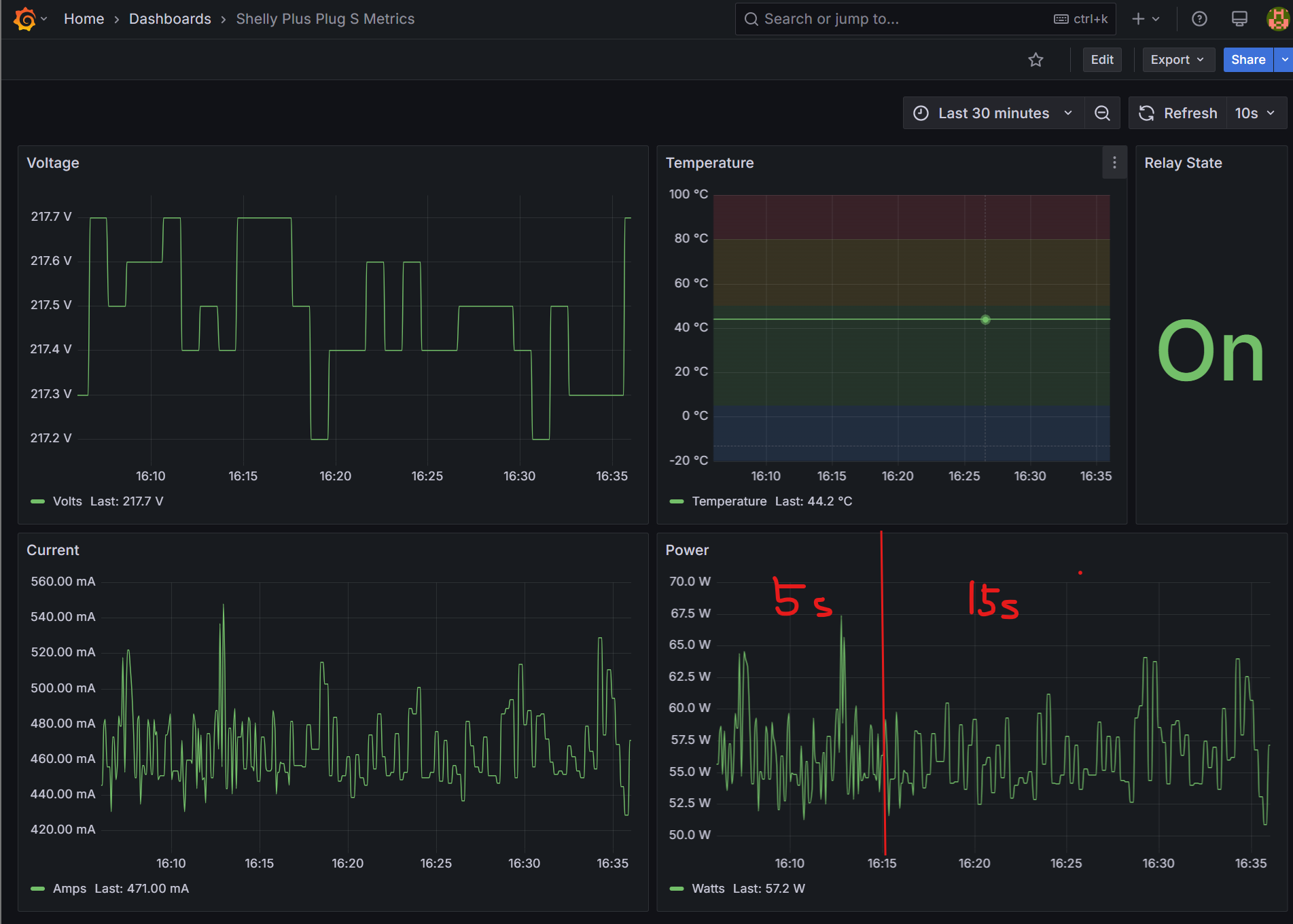
📊 전압, 전류, 전력, 온도, RSSI 등 주요 전기적 데이터가 실시간으로 표시됩니다.
⚡️ 결과 및 안정성 향상
| 항목 | 로컬 모드 | 클라우드 모드 |
|---|---|---|
| 네트워크 의존성 | 내부망 한정 | 어디서나 접근 가능 |
| IP 변경 대응 | 수동 수정 필요 | 자동 클라우드 라우팅 |
| 응답 신뢰도 | LAN 기반 빠름 | HTTPS 기반 안정 |
| 보안성 | 약함 | TLS 암호화 안전 |
15초 단위로 안정적으로 수집되며, Wi-Fi RSSI까지 함께 시각화됩니다.
🚀 마무리
이번 구축으로 Shelly Cloud 기반 전력 모니터링 시스템이 완성되었습니다.
- 라즈베리 파이5 + WSL + Docker 기반 완전 자동화
- Prometheus로 안전한 시계열 수집
- Grafana로 실시간 전력 대시보드 구현
💡 이제 네트워크 환경이 바뀌어도, 플러그가 어디에 있든 데이터는 안정적으로 모니터링됩니다.
다음 편에서는 RPi 클러스터의 전력 효율을 Shelly 데이터를 기반으로 분석하고, 클러스터 노드별 소비 패턴을 시각화해보겠습
'Research > Raspberry Pi' 카테고리의 다른 글
| 라즈베리 파이5 레시피 #7: 개발자를 위한 실시간 전력 모니터링 대시보드 구축기 (0) | 2025.05.27 |
|---|---|
| 라즈베리 파이5 레시피 #6: Shelly Plug S로 실시간 전력 모니터링 시작하기 (0) | 2025.05.26 |
| 라즈베리 파이5 레시피 #5: 포트포워딩 없이 외부에서 원격 접속하는 법! (feat. Tailscale) (0) | 2025.04.30 |
| 라즈베리 파이5 레시피 #4: 클러스터 확장 - RPi 추가 시 SSH 설정 가이드 (1) | 2025.04.29 |
| 라즈베리 파이5 레시피 #3: SSH 키 인증과 ProxyJump 설정으로 클러스터 관리 효율화하기 (1) | 2025.04.29 |